3 - Reverse Engineering the TI EV2300: The DLL Battle
Contents
“I’ve been through the desert on a horse with no name” — America
The Timeout That Wouldn’t Die
After Part 2 I had bqStudio reading registers through the STM32 bridge. The silent command fixes got the GUI working. But the DLL path—bq80xrw.dll’s ReadSMBusWord—still returned “EV2X00 Adapter USB Timeout” every single time.
The confusing part: every manual test worked. WriteFile + ReadFile, overlapped I/O, HidD_GetInputReport, HidD_SetOutputReport, even WriteFileEx with APC completion routines. I could send a ReadWord command and get back a perfect 0x41 response with the correct register data. 10ms response time. The protocol was right, the data was right, the CRC was right.
But lib.ReadSMBusWord(0x0B, byref(value), 0x08) returned status 8. Every time.
I spent hours trying every possible HID transport variation. All worked manually, all failed through the DLL. At some point you have to stop guessing and start disassembling.
Ghidra
Decompiling bq80xusb.dll
I downloaded Ghidra 11.3.1, pointed it at bq80xusb.dll, and ran headless decompilation on every exported function. The DLL is 32-bit, 51 KB, 25 C++ exports with mangled names like ?PutPacket@@YAHHHPAD@Z. Ghidra demangled and decompiled all of them. 190 functions total, ~25 interesting ones.
First I checked the PE imports to understand what APIs the DLL actually uses:
HID.DLL:       HidD_SetNumInputBuffers, HidD_GetSerialNumberString,
               HidD_GetHidGuid, HidD_GetAttributes
SETUPAPI.dll:  SetupDiGetClassDevsA, SetupDiEnumDeviceInterfaces, ...
KERNEL32.dll:  CreateFileA, WriteFileEx, ReadFile, CreateThread,
               SleepEx, GetOverlappedResult, WaitForSingleObject, ...
No HidD_GetInputReport. No HidD_SetOutputReport. The DLL uses WriteFileEx (with APC completion routines) for sending and ReadFile (overlapped) for receiving. Plus CreateThread—there’s a background I/O thread.
InitializePort — How the DLL Opens the Device
int InitializePort(int,int,short,short,short,short,uint,uint,uint) {
    DAT_1000cbe4 = 0;         // mode flag
    DAT_1000d024 = 0;         // report ID
    DAT_1000c008 = 0x40;      // max packet size (64)

    DAT_1000c000 = CreateFileA(
        &device_path,
        0xC0000000,            // GENERIC_READ | GENERIC_WRITE
        0,                     // NO SHARING --- exclusive access!
        &security_attrs,
        3,                     // OPEN_EXISTING
        0xC0000004,            // FILE_FLAG_OVERLAPPED | FILE_FLAG_WRITE_THROUGH
        NULL);

    HidD_GetAttributes(DAT_1000c000, &attrs);

    if ((attrs.PID == 0x0036 || attrs.PID == 0x0037) && attrs.VID == 0x0451) {
        DAT_1000cbe4 = 1;     // EV2300 detected --- enable mode 1
        if (attrs.PID == 0x0037) {
            DAT_1000d024 = 0x3F;   // different report ID for EV2400
            DAT_1000c008 = 0x3F;   // different packet size
        }
        DAT_1000cbe0 = DAT_1000c008 - 1;  // max chunk = 63
    }

    HidD_SetNumInputBuffers(DAT_1000c000, 0x200);  // 512 input buffers!

    // Create the background read thread
    DAT_1000c004 = CreateThread(NULL, 0, ReadThreadFunc, NULL, 0, &threadId);
    SetThreadPriority(DAT_1000c004, 0x0F);  // THREAD_PRIORITY_TIME_CRITICAL
}
Two things jumped out. First: dwShareMode = 0 means exclusive access—no other process can open the device while the DLL has it. Second: HidD_SetNumInputBuffers(handle, 512)—the DLL configures a massive input buffer so it never drops reports. We were using the default (which is like 8).
PutPacket — Mode 1 Encoding
int PutPacket(int pipe, int len, char *data) {
    SleepEx(0, 1);  // process pending APCs
    // ...
    if (DAT_1000cbe4 == 1) {
        _Size = DAT_1000c008 + 1;  // 65 bytes total
        _memset(_Dst, 0, _Size);
        *_Dst = DAT_1000d024;           // byte[0] = report ID (0x00)
        *(_Dst + 1) = (char)chunk_len;  // byte[1] = chunk length
        memcpy(_Dst + 2, data, chunk_len);  // byte[2..] = frame data
    }
    WriteFileEx(handle, _Dst, _Size, overlapped, completion_routine);
    // ...
}
Mode 1 prepends a chunk-length byte before the frame data. But here’s the thing—for small packets (< 63 bytes), the chunk length equals the frame data length, which equals the frame’s own length byte. They’re the same value at the same position. EV2300 packets are always well under 63 bytes, so the chunking never actually splits anything.
This wasn’t the bug. But it led me to the real one.
The Read Thread
GetPacket doesn’t read from HID directly. It reads from an internal circular buffer queue:
int GetPacket(int pipe, int size, char *buf) {
    FUN_10002d20(&queue, buf, &size);  // blocking queue read
    if (size == -1) size = 0;
    return size;
}
The queue is populated by the background read thread:
void ReadThreadFunc(void) {
    event = CreateEventA(NULL, 1, 0, NULL);

    while (1) {
        ResetEvent(event);
        ReadFile(handle, buffer, 256, &bytes_read, &overlapped);

        // Wait for completion, polling every 1ms
        do {
            result = WaitForSingleObject(event, 1);
            if (handle == INVALID) { CancelIo(); ExitThread(); }
        } while (result != 0);

        if (bytes_read == 0) { SleepEx(1, 1); continue; }

        // MODE 1: validate chunk alignment
        if (DAT_1000cbe4 == 1) {
            num_chunks = bytes_read / 65;
            if (bytes_read % 65 != 0) {
                // NOT A MULTIPLE OF 65 --- DISCARD!
                continue;
            }

            // Extract data from each 65-byte chunk
            for (i = 0; i < num_chunks; i++) {
                offset = 65 * i;
                data_len = buffer[offset + 1];   // chunk length at byte[1]
                data_ptr = &buffer[offset + 2];  // data starts at byte[2]
                // Push data_len bytes into the queue
                memcpy(queue_write_ptr, data_ptr, data_len);
                advance_queue(data_len);
            }
        }
    }
}
There it is. bytes_received % 65 != 0 → discard. ReadFile returns 65 bytes for our device (1 byte report ID + 64 data bytes). 65 % 65 = 0, so it passes. But with bInterval=10ms, the USB host polled every 10ms and the DLL’s read thread sometimes missed the response window entirely. Changing to bInterval=1ms fixed the timeout.
Now the DLL could read responses. But they came back as “No acknowledge from device” instead of actual data. Status went from 8 (timeout) to 772 (NACK). The DLL was receiving our response but rejecting it.
Decompiling bq80xrw.dll
So the transport layer was working but the data was being rejected. Time to decompile the higher-level DLL. I pointed Ghidra at bq80xrw.dll (73 KB, 45 exports) and went straight for ReadSMBusWord:
void ReadSMBusWord(byte reg, short *value, short addr) {
    *value = 0;
    local_98 = (byte)addr;       // I2C address
    local_97[0] = reg;           // register

    BuildPacket(local_14, 0x01, 2, &local_98);  // cmd=READ_WORD, plen=2
    FlushStaleData();

    status = PutPacket(0, 10, local_14);  // send 10 bytes!
    if (status == 10) {
        result = ReadResponse(&local_94, 2000);  // 2 second timeout
        if (result != 0) {
            if (IsError(&local_94)) {
                HandleError(&local_94);
            } else if (local_93 == 'A') {     // 0x41 = success
                *value = local_8d;             // word at offset 7
            }
        }
    }
}
PutPacket(0, 10, ...) — sends only 10 bytes, not 64. That’s just the frame data: [0xAA, cmd, reserved(3), plen, addr, reg, CRC, 0x55]. The DLL passes the exact frame size, not a padded buffer. And local_93 == 'A' is checking for ASCII A = 0x41 (READ_WORD success response code). The word value is extracted from offset 7 of the response buffer.
Then FlushStaleData (FUN_10001f10) caught my eye:
void FlushStaleData(void) {
    GetPacket(0, 2, buf);       // try to read 2 bytes
    if (got_data) {
        GetPacket(0, 12, buf);  // drain more
        FlushReceiveBuffer(0, 0);
    }
}
The DLL drains the queue before every operation. It knows stale data might be sitting there from a previous command. This is why silent commands matter—if I2CPower (0x18) sends a response, that response sits in the queue and FlushStaleData eats 2 bytes of it, but the remaining bytes corrupt the next ReadResponse.
The CRC Bombshell
I decompiled FUN_10002070—the response parser:
int ReadResponse(byte *buf, int timeout) {
    SetTimeout(0, timeout);
    // Read bytes one at a time until we find 0xAA
    do {
        GetPacket(0, 1, buf);
        SetTimeout(0, 1);  // 1ms for subsequent reads
    } while (*buf != 0xAA);

    GetPacket(0, 5, buf + 1);   // cmd + reserved[3] + plen
    GetPacket(0, buf[5] + 2, buf + 6);  // payload + CRC + end marker

    // CRC CHECK
    saved_crc = buf[buf[5] + 6];
    RecomputeCRC(buf);
    if (saved_crc != buf[buf[5] + 6]) {
        return ReadResponse(buf, remaining_timeout);  // RETRY on CRC fail
    }
    // ...
}
Then I decompiled RecomputeCRC (FUN_10002490):
void RecomputeCRC(byte *buf) {
    byte *start = buf + 1;    // starts AFTER 0xAA
    int count = buf[5] + 5;   // plen + 5 bytes
    // CRC-8 over 'count' bytes starting from cmd
    for (int i = 0; i < count; i++) {
        crc = table[*start++ ^ crc];
    }
    *start = crc;  // write computed CRC
}
plen + 5 bytes. For a ReadWord response with plen=4, that’s 9 bytes: [cmd, reserved(3), plen, reg, lo, hi, addr7].
Nine bytes. My firmware was computing CRC over 8 bytes—I was excluding the trailing addr7 byte with a crcSkipTail=1 parameter. I’d added that based on captures from the real EV2300 where the CRC appeared to exclude the last byte.
I computed both:
our_crc = crc8([0x41, 0x00, 0x00, 0x01, 0x04, 0x0B, 0x19, 0x00])       # 8 bytes -> 0xF3
dll_crc = crc8([0x41, 0x00, 0x00, 0x01, 0x04, 0x0B, 0x19, 0x00, 0x08])  # 9 bytes -> 0xEF
0xF3 vs 0xEF. The DLL recomputed the CRC, got 0xEF, compared it to our 0xF3, failed, retried, got the same response, failed again, and eventually timed out. That’s why it reported “USB Timeout” even though it was receiving our packets perfectly. It read them, rejected the CRC, retried until the timeout expired, and gave up.
One line fix: crcSkipTail=0 everywhere. Include the address byte in the CRC.
// Before (wrong):
EV2300_BuildRawResponse(0x41U, payload, 4U, 1U);  // crcSkipTail=1

// After (correct):
EV2300_BuildRawResponse(0x41U, payload, 4U, 0U);  // crcSkipTail=0
The Moment
=== DLL Trace (CRC fix + SetTimeout) ===
Open: 0
SetTimeout: 5000ms
I2CPower: 0 (Operation executed successfully.)
ReadSMBusWord(CC_CFG): status=0 value=0x0019
*** SUCCESS! CC_CFG = 0x0019 ***
ReadSMBusWord(SYS_STAT): status=0 value=0x0084
*** SUCCESS! SYS_STAT = 0x0084 ***
Status 0. After weeks of 772 and 8. The DLL read CC_CFG = 0x0019 from the BQ76920 through our STM32 bridge. The real EV2300 was no longer necessary.
One More Bug
“Wrote 0x11, Read Back 0x08”
The TI GUI has a “Read or Write one hex byte to a register” panel. Write 0x11 to register 0x0B, click “Read Byte”, get back… 0x08. Not 0x11. Always 0x08, regardless of what you wrote.
0x08 is the BQ76920’s I2C address.
The GUI’s “Read Byte” uses ExtendedRead (0x1D), not ReadByte (0x03). Back to Ghidra. I found the I2CReadBlock function in bq80xrw.dll which handles ExtRead:
void I2CReadBlock(byte addr, int output_buf, short count) {
    local_194 = addr;
    local_193 = start_reg;
    local_192 = (byte)count;

    BuildPacket(local_8c, 0x1D, 3, &local_194);  // cmd=EXT_READ, plen=3
    FlushStaleData();
    status = PutPacket(0, 11, local_8c);

    if (status == 11) {
        result = ReadResponse(&local_114, 2000);
        if (result != 0) {
            if (IsError(&local_114)) {
                HandleError(&local_114);
            } else if (local_113 == 'R') {  // 0x52 = ExtRead success
                // Copy data from response buffer offset 8
                for (i = 0; i < count; i++) {
                    output_buf[i] = response_buffer[8 + i];
                }
            }
        }
    }
}
response_buffer[8 + i]. Offset 8 from the start of the response buffer. The response buffer is filled by ReadResponse which reads: [0] = 0xAA, [1] = cmd, [2-4] = reserved, [5] = plen, [6..] = payload. So offset 8 is payload[2].
My ExtRead payload was {count, data[count], addr7}—the data sat at payload[1] (offset 7), the address at payload[2] (offset 8). The GUI read offset 8 and got addr7 = 0x08 every time. Regardless of the actual register value.
Fix: add the register byte at the start of the payload. {reg, count, data[count], addr7}. Data moves to offset 8.
payload[0] = reg;
payload[1] = count;
memcpy(&payload[2], data, count);
payload[2U + count] = Bridge_GetAddress7(addr);
Write 0x11, read back 0x11. Done.
The Hardware
$25 EV2300 Replacement
The final hardware is an Adafruit Feather STM32F405 on a small perf board breakout that maps the Feather’s I2C pins to the same header and cable the real EV2300 uses. Plug in the ribbon cable from the EVM, plug in USB-C, done.
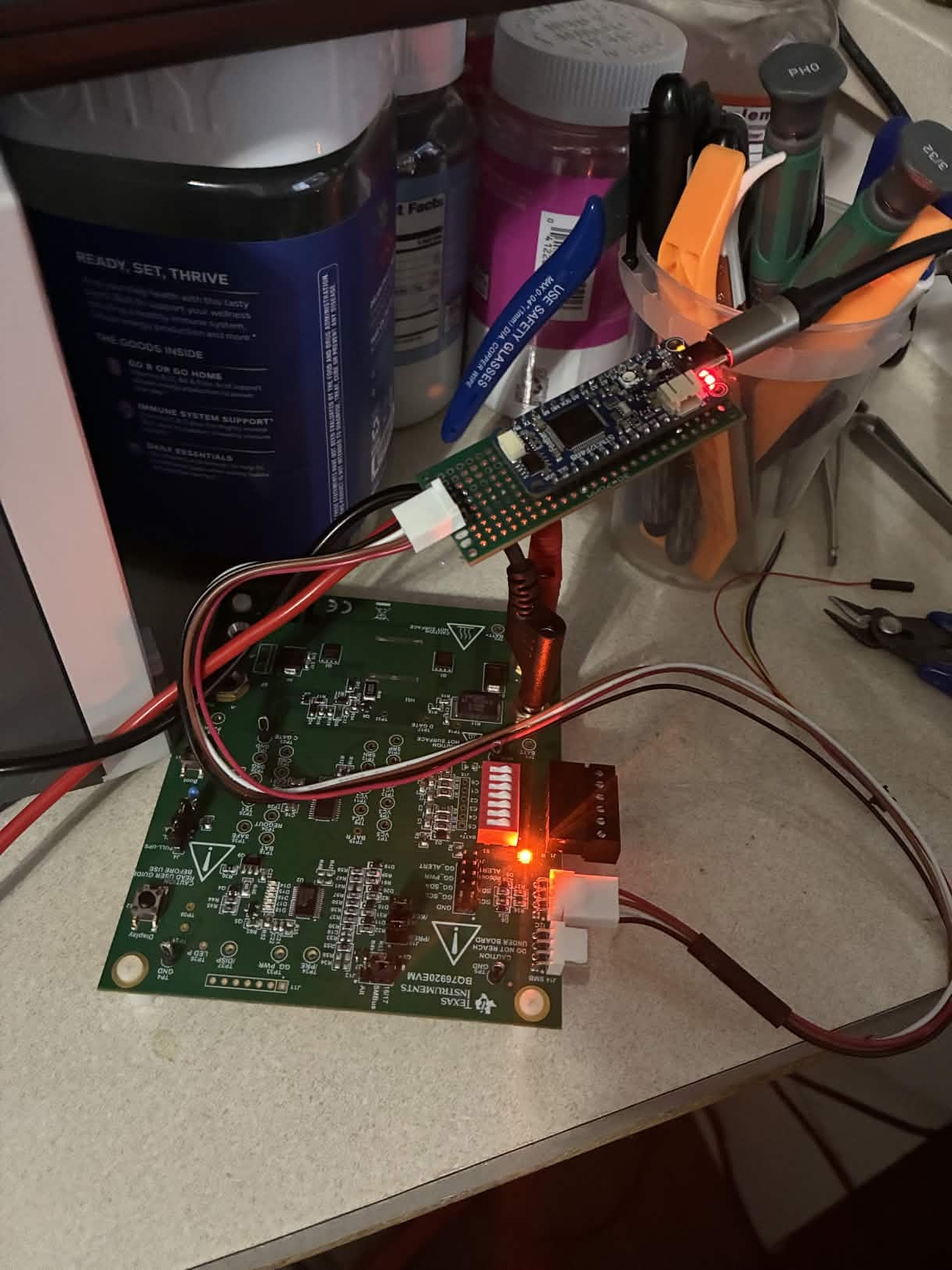
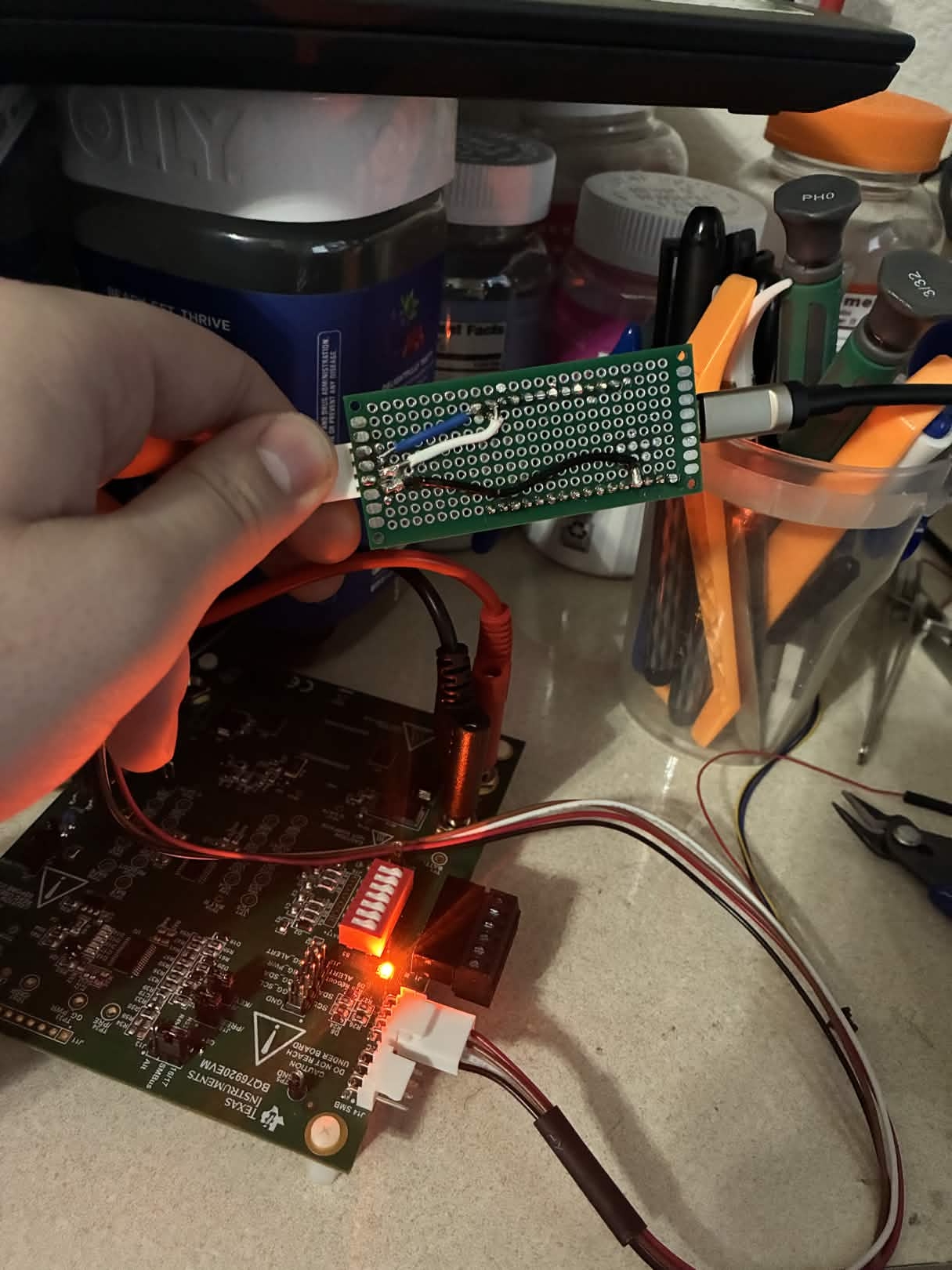
Plug the USB-C into a PC, the jumper wires into J8, apply 18V to the EVM, and it’s a drop-in replacement for the $200 EV2300. bqStudio connects, registers read and write, the Python driver works, the DLL works. 20/20 bench tests pass.
The Complete Bug List
For posterity—every protocol bug we found and fixed, in the order they bit us:
| # | Bug | Impact | Fix |
|---|---|---|---|
| 1 | totalLen off by 1 (plen+9 vs plen+8) |
Every response packet wrong | Correct formula |
| 2 | READ_WORD payload {addr8, lo, hi} vs {reg, lo, hi, addr7} |
DLL can’t parse values | Correct format, 4 bytes |
| 3 | WRITE_BYTE (0x07) sends response | Poisons HID buffer | Make silent |
| 4 | SUBMIT returns error on I2C NACK | DLL expects always-success | Always return 0xC0 |
| 5 | Error responses missing payload | DLL can’t parse error type | Add {0x00, 0x93} payload |
| 6 | Reserved byte[5] = 0x00 vs 0x01 | DLL rejects frame | Set to 0x01 |
| 7 | CRC includes vs excludes addr byte | DLL CRC check fails silently | crcSkipTail=0 |
| 8 | I2CPower (0x18) sends response | Stale 0x46 poisons next read | Make silent |
| 9 | ExtendedWrite (0x1E) sends response | GUI reads stale error | Make silent |
| 10 | bcdUSB = USB 2.0 vs USB 1.1 |
Windows HID driver behavior differs | Set 0x0110 |
| 11 | bInterval = 10ms vs 1ms |
DLL read thread misses responses | Set 1ms |
| 12 | Manufacturer string too long | DLL string comparison fails | Truncate to “Texas Inst” |
| 13 | Serial number format wrong | GetFreeBoardsEV2300A returns 0 |
Match HPA02 FW:2.0a/TUSB3210:0 |
| 14 | ExtRead payload missing reg byte | GUI reads addr instead of data | Add reg byte at offset 0 |
| 15 | ReadBlock returns only 1 data byte | Block reads incomplete | Return all requested bytes |
15 bugs. Two CRC bytes changed everything. One Ghidra session saved the project.
What’s Running Now
- 21/21 protocol compliance tests
- 20/20 bench tests (18V supply, real BQ76920 EVM)
- TI bqStudio GUI: full register read/write
- TI DLL (
bq80xrw.dll): ReadSMBusWord, WriteSMBusWord, I2CPower - Python automation via scpi-instrument-toolkit
- Cross-platform: Python driver works on Windows (ctypes) and Linux (hidraw)
Total firmware size: 48 KB flash, 8 KB RAM. The STM32F405 has 1 MB flash and 192 KB RAM. We’re using less than 5% of the chip.
Source code: github.com/CesMag/BQ76920_Bridge Python driver: github.com/T-O-M-Tool-Oauto-Mationator/scpi-instrument-toolkit